Chiefs Mobile
4.11.38KReviews
Analysis ByAppCompare
If you follow the Kansas City Chiefs, Chiefs Mobile is the most direct way to keep the team close without relying entirely on a general sports app. I approached it as a first-time user would: install it, look for something useful before a game, and see whether it earns a regular place on my phone. My overall impression is positive. It is a free sports app from YinzCam, Inc. with a clear team focus, an Everyone content rating, and a 4.1 average from around 4.8 thousand ratings. It has passed the half-million-install mark, so it is not a niche experiment.
The important distinction is that this is not trying to be a complete replacement for every sports service. Its value comes from concentrating the Chiefs experience in one place. If I want team-centered information, official material, and a simpler route to Chiefs-related updates, it makes sense. If I mainly follow several leagues, compare scores across many teams, or want a broad statistical tool, a general sports app may still be more practical.
What to expect before you start
The app’s identity is straightforward: it is the official mobile app of the Kansas City Chiefs. That focus affects almost every decision a new user should make. I would not install it expecting a neutral scoreboard covering the entire sports world. I would install it because I want the Chiefs presented as the main subject rather than as one tile among dozens of teams.
That narrower purpose is also its first strength. A general sports application can be excellent at scanning scores, but it often makes me move through league menus, team lists, and unrelated headlines before I reach the club I care about. Chiefs Mobile reduces that distance. For a supporter checking in briefly during a commute, before kickoff, or after seeing a notification, a dedicated team app feels more natural.
The app is free, and its age rating is Everyone, which makes it approachable for families and younger fans as well as longtime supporters. It first appeared on September 10, 2013, and the current version is 3.9.2. Those details matter less than the practical point: this is an established Chiefs companion rather than a one-off promotional download.
I also like that the app’s purpose is easy to understand before opening it. There is no learning curve caused by an unusual concept. The challenge is not figuring out what the app is for; it is deciding which parts deserve your attention and which parts you can ignore. That is a much easier problem for a first-time user.
Who will get the most from it
I would recommend it first to a fan who wants a team-specific starting point. It is especially suitable if your normal routine is to check Chiefs information in short visits instead of reading every sports story available. It can also work well for someone who wants a more official-feeling home for team content than a social feed, where updates are mixed with opinions, jokes, advertisements, and unrelated conversations.
It is less convincing for a person who follows many teams equally. In that case, switching between dedicated club apps can become inconvenient, and a broad sports service may offer a faster overview. The same applies if your priority is deep analysis rather than staying connected to the team. Chiefs Mobile is best understood as a focused companion, not as a full replacement for every source a serious sports follower might use.
Setting it up without getting lost
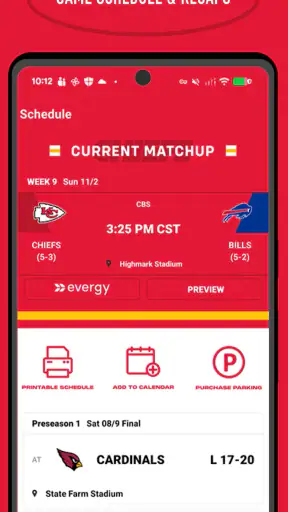
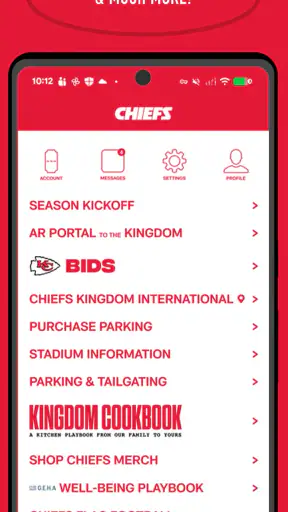
My advice is to begin with a simple goal instead of trying to inspect every screen immediately. After installation, open the app and look for the most obvious team-centered area first. I would start by locating the current Chiefs information and learning how the main navigation is arranged. Once I know where the central content lives, I can return later for less urgent sections without feeling that setup has turned into homework.
Because the app is dedicated to one club, the first useful setup is mental rather than technical: decide what you want it to do for you. If you want a quick pregame check, concentrate on the areas that help you understand what is happening around the team. If you want a place to revisit team material during the week, explore the content areas at a slower pace. The app becomes more useful when it supports a routine instead of becoming another application I open randomly.
I would also give the interface a few minutes before judging it. Official team apps often combine several kinds of information, and the most valuable feature for one fan may be background noise for another. A reader who wants news may care about a different path than someone checking a game situation. Rather than assuming the first screen represents everything, I would tap through the main sections once, note where the information I want is kept, and then stop exploring.
A practical first-session workflow is simple:
Open the app when you have enough time to look around, not only during a rushed game moment.
Identify the main Chiefs content area and the route back to it.
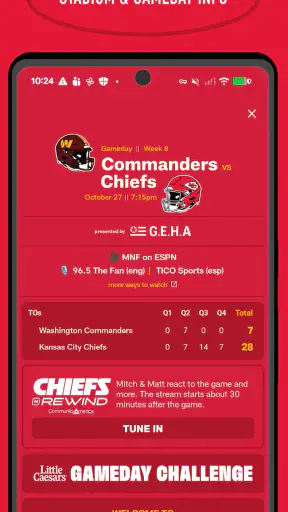
Check how game-related information is presented so you know where to return on a busy day.
Visit the other prominent sections once, then keep only the parts that match your habits.
This approach avoids a common mistake: treating every visible item as equally important. A dedicated sports app can contain more material than a casual user needs. The goal is not to memorize the whole layout. The goal is to create a dependable path from opening the app to finding one meaningful update.
The first successful action
For a new user, the first success should be something concrete: opening Chiefs Mobile and reaching the information you installed it to find without leaving for another service. In my case, that means using the app as a focused team check-in. I would open it before a game, find the relevant team information, and confirm that I can return to that area later. That small achievement tells me whether the app fits my day-to-day behavior.
There is a useful habit here that is easy to overlook. Do not wait for a major game moment to learn the layout. A few minutes of exploration on an ordinary day can prevent frustration when you are trying to check something quickly. Sports apps feel most valuable when time is limited, so learning the route in advance is more useful than discovering it while distracted.
I would also use the app in two different ways to test its fit. First, open it for a very short visit and see whether the main team information is easy to reach. Then spend a longer session browsing the broader material. If the short visit works but the longer one feels cluttered, that is not necessarily a deal-breaker; it simply means I should treat the app as a quick reference rather than a place to explore endlessly.
Another good test is to compare the experience with your existing routine. If you already use a general sports app, check whether Chiefs Mobile gives you a more satisfying team-centered view. The question is not whether it contains every tool your current app has. The question is whether it makes following the Chiefs feel more direct. For many fans, that difference is the reason to keep both applications installed.
How it fits into an ordinary game day
Imagine a realistic Saturday or Sunday routine. I am away from the television, have a few minutes before meeting friends, and want to reconnect with the Chiefs without searching through a large sports feed. I open the dedicated app, go straight to the team-focused area I learned earlier, and use that short visit to orient myself. Later, when the game becomes the center of attention, I already know where to look instead of spending the opening moments navigating.
The same workflow can help during a busy workday. I may not have time to read everything, but I can make a brief check, close the app, and return when I have more attention. That is where a team-specific design has a practical advantage: it limits the amount of filtering I have to do. I am not opening the app to discover what sports matter today; I already know the answer.
For families, the Everyone rating also makes the app easier to consider as a shared team companion. A parent can introduce it to a younger fan without the age-rating concern associated with more mature entertainment apps. That does not guarantee that every screen will suit every person, but the overall classification supports a broad audience.
Common confusion and honest limitations
The biggest possible misunderstanding is expecting Chiefs Mobile to behave like a universal sports dashboard. Its concentration is the point, but concentration also means less breadth. If I want fast comparisons across unrelated teams, league-wide browsing, or a single place for several sports, I would probably choose a general sports app first and keep this one only for a more dedicated Chiefs experience.
Another source of friction is the difference between official presentation and personal customization. A team app naturally emphasizes the club’s own perspective. That can feel more relevant than a broad feed, but it may not satisfy someone who wants extensive independent commentary or a highly configurable information stream. I see the official focus as a benefit when I want team-centered material, and a limitation when I want a wider debate around it.
It is also worth separating the app’s usefulness from the quality of a particular visit. A sports application can feel quiet when there is no immediate event and much busier when the team is active. I would not judge it solely by a calm off-day session. Instead, I would ask whether it gives me a reliable place to return during the moments when I actually need it.
The current version, 3.9.2, runs on operating systems starting with version 10. That is helpful for many users, but anyone with an older device should check compatibility before planning around it. I would also keep expectations realistic about performance: the experience depends on the phone, the operating system, and the quality of the connection being used. A dedicated app cannot remove those everyday variables.
One subtle trade-off is attention. Because the app is built around one team, it can encourage more frequent checking than a broad app where the Chiefs are only one part of the feed. That is useful if you enjoy regular updates, but unnecessary if you are trying to reduce sports notifications and screen time. I would make the app serve a specific habit rather than letting it create one by default.
Three practical ways to use it better
First, create a “short visit” habit. Decide what you want to check in under a minute and use the app for that purpose. This keeps the dedicated experience from becoming a time-consuming scroll and makes it more valuable on workdays or while traveling.
Second, learn the navigation when nothing urgent is happening. This is a small but genuinely useful advantage. When a game is underway, familiarity matters more than curiosity. Knowing the route to the team information you care about can save attention at exactly the moment you do not want to experiment.
Third, use it alongside, not automatically instead of, a broader sports source. Chiefs Mobile can be your team-specific home while another application handles league-wide scores or several favorite clubs. That combination may be better than forcing one app to perform two different jobs. The trade-off is having another icon on the phone, but the benefit is clearer organization.
A fourth insight is to judge the app by repeatability. The first opening may be interesting, but the real test is whether the second and third visits feel easier. If you can return to the same useful area without thinking, the app is doing its job. If every visit feels like searching through a new layout, your general sports app may be the more efficient daily tool.
My recommendation after using it
I would suggest Chiefs Mobile to a Kansas City Chiefs supporter who wants a focused, free team companion and does not mind keeping a separate service for broader sports coverage. The app’s strongest quality is not that it tries to do everything. It is that it gives the Chiefs a dedicated place on the phone, which makes short check-ins more purposeful than browsing a crowded sports feed.
I would skip it if my main need is a multi-team dashboard, extensive league comparison, or a highly independent analysis experience. In those situations, the usual alternatives are likely to be faster and more complete. I would also avoid installing it solely because I expect every sports need to be consolidated into one application. That is not where its advantage lies.
For a first-time user, the path is reassuringly simple: install the app, spend a few minutes learning the main route, use it for one focused Chiefs check, and then decide whether that routine feels better than your current method. The app’s 4.1 average from roughly 4.8 thousand ratings suggests a generally favorable reception, while its focused design explains why some fans will find it more useful than others.
My final view is that this is a sensible download for fans who want the Kansas City Chiefs to be the center of their sports app rather than an item in a much larger list. I would keep it for official team-focused visits and use a broader service when I need the rest of the sports world. That division of labor gives Chiefs Mobile a clear role, and in my experience, apps with a clear role are the ones I am most likely to keep using.
FAQ
What is Chiefs Mobile, and what can I do with the app?
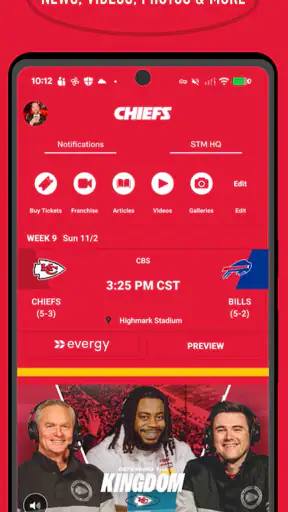
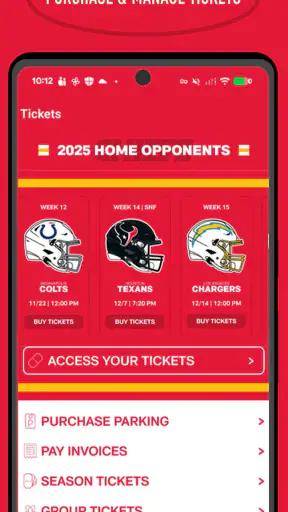
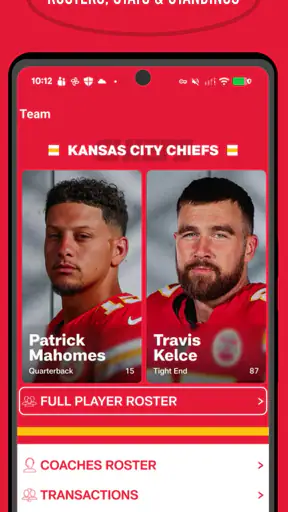
Chiefs Mobile is the official mobile app for following the Kansas City Chiefs. After installing it, users can usually access team news, game schedules, scores, standings, player and roster information, videos, photos, social updates, and other club content. It may also provide live game-day features, notifications, ticket information, merchandise links, and details about events at GEHA Field at Arrowhead Stadium.
Does Chiefs Mobile offer live game scores and notifications?
Yes, the app is designed to keep fans updated during the season with scores, schedules, game results, standings, and breaking team news. You can generally enable push notifications for upcoming games, scoring plays, final results, roster announcements, and other important updates. Notification categories may vary by device, app version, and your selected preferences, so it is worth reviewing the settings after installation.
Can I watch live Kansas City Chiefs games through Chiefs Mobile?
Chiefs Mobile may provide live audio, video clips, press conferences, highlights, interviews, and selected game-day coverage, but it should not automatically be considered a complete live-game streaming service. Availability depends on broadcasting rights, your location, the NFL season, and any required television or streaming subscription. Check the in-app game details before relying on it to watch a full live match.
Does Chiefs Mobile require an account, subscription, or payment?
Many of the app’s basic features, such as reading news, checking schedules, viewing scores, and browsing public team content, are typically available without a paid subscription. Certain services may require an account, including personalized notifications, ticket management, loyalty features, or purchases. Content involving live broadcasts or premium services can also depend on separate provider subscriptions, while data charges may apply when using mobile networks.
Is Chiefs Mobile safe to download, and what permissions does it request?
The safest way to install Chiefs Mobile is through the official Google Play Store or Apple App Store, rather than downloading an unofficial APK or modified version. Like many sports apps, it may request permissions for notifications, approximate location, internet access, and possibly account or device-related functions. Review the privacy policy and permission prompts carefully, and disable optional access that you do not need.
Pros
- Quick match sessions suit short breaks and casual play.
- Simple controls make it easy for new players to get started.
- Team-building adds variety beyond individual match performance.
- Regular challenges can provide extra goals for returning players.
- Runs smoothly on many modern Android and iOS devices.
Cons
- Progress may feel slow without frequent play or optional purchases.
- Online matches can be frustrating when facing stronger
- upgraded teams.
- Some features require a stable internet connection to work properly.
- Menus and upgrade systems may feel overwhelming at first.
- Battery use can increase during longer matches and online sessions.